Ultra Menu 1.2
Updated on 15 Feb 2012
By Anthony Buckner
By Anthony Buckner
Specifications
License:
Commercial
Updated:
Downloads:
712
Platform:
Windows All
Publisher:
AntsSoft(more)
Website:
User Reviews:
Other versions:
1.0, 1.0
Do you like
Ultra Menu?
Ultra Menu?
Publisher's Descriptions
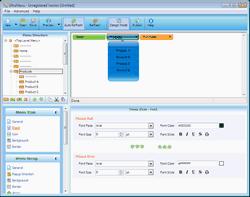
UltraMenu is a DTHML/JavaScript web menu builder. With its help, you can easily complete the creation of navigation menus for a web site even without any development experience related to DHTML or JavaScript. It can generate cross-browser pop-up or drop-down menus compatible with all popular browsers including Internet Explorer, FireFox, Netscape Navigator, Opera, Mozilla, Konqueror, Safari and Camino, etc. UltraMenu supports hierarchical menus, and you can customize such attributes as layout, text, font style, link, background, border, animation effects, etc. for menus, menu groups and menu items separately based on your requirements. After you have completed the design of a menu, you can add it into your web pages by UltraMenu's Publish Wizard in a breeze. UltraMenu will save you a significant amount of time and effort required to fully understand DHTML and JavaScript code capable to support all DHTML-enabled browsers!
Major features include:
Menu codes generated by UltraMenu are compatible with all major operating systems and browsers, and keep the maximum visual consistency on all browsers.
40 meticulously designed templates of different styles are included. You can create a menu by any template, and customize it based on your requirement after that.
For the final web menus generated by UltraMenu, you can fully customize all the attributes of the menu in advance.
Multiple-selection editing is supported. You can choose multiple menu items at the same time, and modify their attributes together.
The "Preview" window can work in both Normal and Design modes. You can preview a menu with the default page, or specify an existing HTML file as the preview page. Besides the embedded "Preview" window, you can also add multiple external browsers to test the working of the menu in other browsers.
"Publish Wizard" can help you add the finally generated menu code to your web pages.
One web page can include multiple menus generated by UltraMenu.
Major features include:
Menu codes generated by UltraMenu are compatible with all major operating systems and browsers, and keep the maximum visual consistency on all browsers.
40 meticulously designed templates of different styles are included. You can create a menu by any template, and customize it based on your requirement after that.
For the final web menus generated by UltraMenu, you can fully customize all the attributes of the menu in advance.
Multiple-selection editing is supported. You can choose multiple menu items at the same time, and modify their attributes together.
The "Preview" window can work in both Normal and Design modes. You can preview a menu with the default page, or specify an existing HTML file as the preview page. Besides the embedded "Preview" window, you can also add multiple external browsers to test the working of the menu in other browsers.
"Publish Wizard" can help you add the finally generated menu code to your web pages.
One web page can include multiple menus generated by UltraMenu.
What's New
New: Support "cross frame"
New: Auto hide SELECT, Flash and IFrame
New: Recent paths entered into "Publish" dialog will be remembered
Improved: The menu preview performance has been improved
Fixed: Avoid scroll bar flicking in web browser
Fixed: Fix "Operation Aborted" error message with IE browser
Fixed: Menu layout will not be affected by global CSS style
Fixed: Incorrect HTML code escaping has been corrected
Fixed: Windows Vista incompatibility problems have been solved
Fixed: Some other menu layout problems have been fixed
New: Auto hide SELECT, Flash and IFrame
New: Recent paths entered into "Publish" dialog will be remembered
Improved: The menu preview performance has been improved
Fixed: Avoid scroll bar flicking in web browser
Fixed: Fix "Operation Aborted" error message with IE browser
Fixed: Menu layout will not be affected by global CSS style
Fixed: Incorrect HTML code escaping has been corrected
Fixed: Windows Vista incompatibility problems have been solved
Fixed: Some other menu layout problems have been fixed
Do you like Ultra Menu
Ultra Menu Disclamer
Please be aware FindMySoft.com accepts no responsibility for the file you are downloading. The same applies to the information provided about the software products listed.
We do not allow the inclusion of any Ultra Menu serial, keygen or crack and we disclaim any liability for the inappropriate use of Ultra Menu.
FindMySoft advises that Ultra Menu should be only used in accordance with the rules of intellectual property and the existing Criminal Code.
For your own protection ALWAYS check downloaded files for viruses.
We do not allow the inclusion of any Ultra Menu serial, keygen or crack and we disclaim any liability for the inappropriate use of Ultra Menu.
FindMySoft advises that Ultra Menu should be only used in accordance with the rules of intellectual property and the existing Criminal Code.
For your own protection ALWAYS check downloaded files for viruses.
Advertising
Popular News
The “Who Touched my Phone” app will show you who snooped on your iPhone while you were away.
The Suspend Background Tabs add-on will prevent background tabs from running periodical actions, thus improving the browser’s performance and preventing unnecessary CPU load.
Your Rating
Top Downloads
2.
Opera5.
Trillian8.
AIM9.
Skype10.
Ad-Aware12.
Nero13.
Google Earth14.
Picasa15.
Winamp16.
iTunes17.
RealPlayer18.
uTorrent19.
eMule20.
WinRAR21.
BitComet22.
WinZip23.
Shareaza24.
CCleaner25.
Recuva26.
Tweak UI27.
CuteFTP Home29.
Adobe Reader30.
NewsPiperBecome A Fan!
Link To Us!
Ultra Menu
HTML Linking Code
HTML Linking Code
Latest Reviews


